

Toggle sidebar
Search...
How to Install ADB on Windows in Less Than 15 Seconds

How to Install ADB on Windows in Less Than 15 Seconds

2 min read
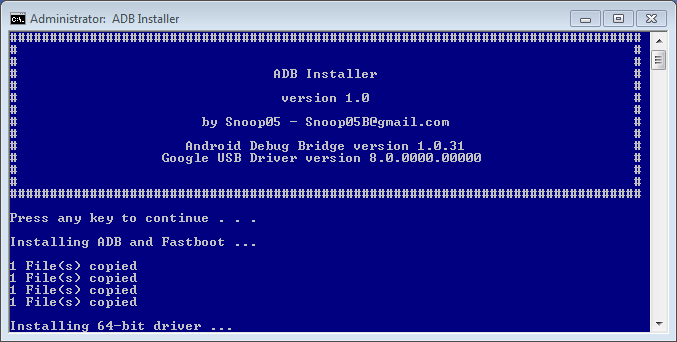
If you’re serious about rooting your Android device, then you’re going to have to get used to the Android Debug Bridge (ADB), which is Android’s most widely-used debugging tool. ADB lets users push a file to the /system directory, which is an essential part of rooting. However, installing ADB on Windows isn’t always easy…until now. Usually, you have to download a 100MB file (ADT Bundle + SDK Tools) to install ADB on your Windows PC. Thanks to a clever workaround from an XDA Developers Forum member, your ADB adventure just became much easier. XDA Developers Forum member snoop5 created a simple tool to install ADB on a Windows PC in just under 15 seconds.

How to Install ADB on Windows

Here’s what this handy tool does: -Installs ADB -Installs Fastboot -Installs all required Android device drivers -Does it in under 15 seconds -Only 9MB download size -Works on both 32 bit and 64 bit systems (no separate download required; the tool automatically identifies your system) The tool walks you through the entire process, so it doesn’t get much easier than this. It’s currently available for a free download here: http://forum.xda-developers.com/showthread.php?t=2588979 Do you have a faster way to install ADB on Windows? Probably not.
One Click Root Author

One Click Root Author

Share this article:

One Click Root Author

One Click Root Author

Content Writer

Experienced writer covering technology and mobile development.

You Might Also Like

Comments

JD
John Doe 2 days ago

Great article! Very informative and well-written. Thanks for sharing.

JS
Jane Smith 5 days ago

I found the security section particularly helpful. Looking forward to more content like this!

Leave a Comment

Newsletter

Get the latest tech news delivered to your inbox weekly.