If you’ve rooted your Android phone, then you may want to unroot that phone at some point in the future.
People unroot their phones for many different reasons. Some people unroot their phones for resale purposes. Others want to download the latest official OTA update from their carrier.
If you want to remote root access on Android, then there are a few different methods available:
Option 1) Using One Click Root
If you are a One Click Root user, then unrooting your device is easy. Just connect your Android device to your computer, run the software, and click the ‘Unroot’ button.
Your device will be unrooted in minutes – we guarantee it. This is the fastest, easiest, and safest way to remove root access from your Android device.
Option 2) Use SuperSU
Download and install the
SuperSU app for free from the Google Play Store (most root users will already have this app installed on their devices).
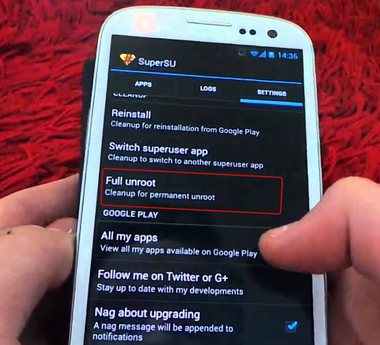
Open SuperSU and click on
Settings in the top right corner of your window, then tap
Full Unroot. Confirm your selection by tapping
Continue.
It takes a few minutes to unroot your device with SuperSU. Once the process is complete, restart your Android device. You will likely want to uninstall SuperSU after you reboot because it’s a useless app without root access.
Check to make sure your device is successfully unrooted
If you’ve rooted your Android, then you may have installed a root checker app to make sure the phone is rooted. To make sure your phone is unrooted, install the same app and run it.
Download this Root Checker app:
https://play.google.com/store/apps/details?id=com.joeykrim.rootcheck
Run the app and, if your device has no root access, then the app will tell you.
As you can see, removing root access permissions from Android is much easier than adding them – unless, of course, you’re using One Click Root, in which case both processes are equally as easy.