SetCPU - The Ultimate Performance Enhancer For Your Android
3 min read
We tend to associate the term CPU or the Central Processing Unit with our desktops but just like a computer, even our device has a central processing unit, which is the heart of our android device. And where there is a heart, it needs to be taken care of from all ailments and diseases.
We need to make sure that the heart of our device is always healthy because its health is our wealth as it protects the phone from repairing costs. It also makes the phone work better and last longer, thus, avoiding our need for a constant replacement of our device. Basically, prevention is better than cure so we need to make sure that our device’s heart is never broken.
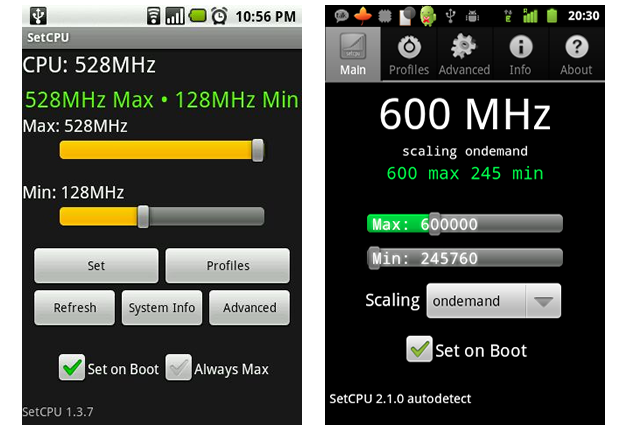
Thus, we need an app called SetCPU, a tool for changing the CPU settings on a rooted Android phone or tablet.
SetCPU works with a great variety of Android devices and ROMs, including the HTC One series, Samsung Galaxy series, and Nexus devices. You are under control: SetCPU can improve your performance, save battery, or both.
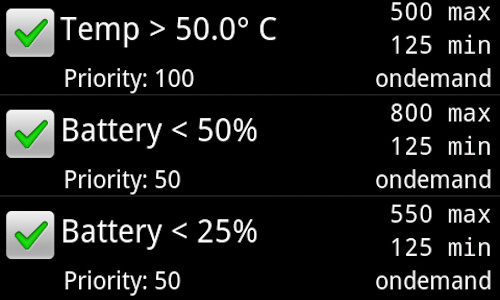
You may automate SetCPU with profiles. It also allows you to set up powerful profiles to change your settings under certain conditions, such as what app is running, when the phone is asleep or charging, when the battery level drops below a certain point, when the phone's temperature is too high, or during certain times of day.
SetCPU's wide feature set makes it useful to Android beginners and enthusiasts alike. Accelerate your processor to unleash your phone's true multitasking potential, or dial your CPU's speed down to save battery.
SetCPU also includes a "voltage control" menu, available to certain devices with custom kernels that support it, to control undervolting to save even more battery. Undervolting is only available for certain kernels.
For those of you who were unaware of this app, it is amazing and for those of you who have used this app before and encountered a few bugs here and there have nothing to worry about anymore because they have all been taken care of:
- Added SUPERUSER permission.
- Fixed a bug where action bar menu items would sometimes not appear for the profiles menu.
- Fixed a bug where voltage items would appear in reverse with some custom kernels.
- Added an open source licenses menu item in About.
In order to use this app you must have a rooted device as it needs root permissions to modify the CPU speed and other settings. SetCPU will start a profiles service at boot, if enabled. It also sets default boot settings, if enabled. SetCPU does not run in the background if profiles are not enabled, and becomes inactive after settings, if any, are applied.
Even though this app requires you to clear some permissions, it is totally worth it because it proves to be your android device’s heart doctor and since our devices today have become as important to us as our limbs, we need to make sure that they are in mint condition!

Thus, we need an app called SetCPU, a tool for changing the CPU settings on a rooted Android phone or tablet.
SetCPU works with a great variety of Android devices and ROMs, including the HTC One series, Samsung Galaxy series, and Nexus devices. You are under control: SetCPU can improve your performance, save battery, or both.
You may automate SetCPU with profiles. It also allows you to set up powerful profiles to change your settings under certain conditions, such as what app is running, when the phone is asleep or charging, when the battery level drops below a certain point, when the phone's temperature is too high, or during certain times of day.
SetCPU's wide feature set makes it useful to Android beginners and enthusiasts alike. Accelerate your processor to unleash your phone's true multitasking potential, or dial your CPU's speed down to save battery.
SetCPU also includes a "voltage control" menu, available to certain devices with custom kernels that support it, to control undervolting to save even more battery. Undervolting is only available for certain kernels.
For those of you who were unaware of this app, it is amazing and for those of you who have used this app before and encountered a few bugs here and there have nothing to worry about anymore because they have all been taken care of:
- Added SUPERUSER permission.
- Fixed a bug where action bar menu items would sometimes not appear for the profiles menu.
- Fixed a bug where voltage items would appear in reverse with some custom kernels.
- Added an open source licenses menu item in About.
In order to use this app you must have a rooted device as it needs root permissions to modify the CPU speed and other settings. SetCPU will start a profiles service at boot, if enabled. It also sets default boot settings, if enabled. SetCPU does not run in the background if profiles are not enabled, and becomes inactive after settings, if any, are applied.
Even though this app requires you to clear some permissions, it is totally worth it because it proves to be your android device’s heart doctor and since our devices today have become as important to us as our limbs, we need to make sure that they are in mint condition!

One Click Root Author
Content Writer
Experienced writer covering technology and mobile development.
You Might Also Like
Root Android
Android 14 Root Methods: What Changed?
Explore the new root methods and security changes in Android 14.
Root Android
Latest Android Security Updates Impact Root Access
Understanding how the latest security patches affect root methods.
Root Android
Google Pixel 8 Pro Root Guide Released
Complete step-by-step guide to rooting the Google Pixel 8 Pro.
Comments
JD
John Doe
2 days ago
Great article! Very informative and well-written. Thanks for sharing.
JS
Jane Smith
5 days ago
I found the security section particularly helpful. Looking forward to more content like this!
Leave a Comment
Newsletter
Get the latest tech news delivered to your inbox weekly.
Popular Posts
-
1
Getting Started with Android Development
12.5K views
-
2
Best Practices for Mobile Security
8.2K views
-
3
Understanding Smartphone Hardware
6.8K views