

 Bot Maker for Android includes the following features:
- Taps, swipes, pauses, text and physical keys input supported.
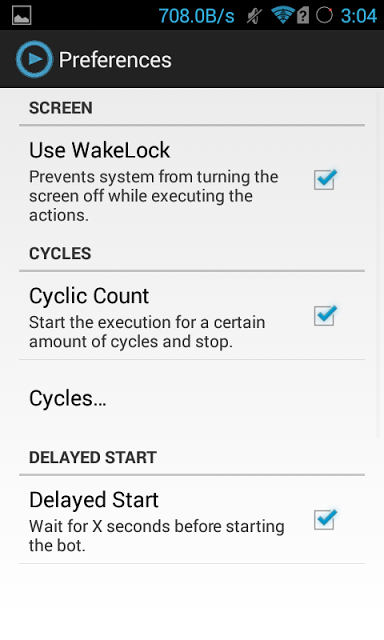
- Wake-Lock to prevent screen turning off
- Delayed start, gives you the necessary amount of time to do what you need before starting the execution.
- Share / import your edited files (.abm extension files)
- Add, select, switch, edit, and remove actions from the list.
- Export it to a shell script, runnable from the terminal emulator or via ADB.
- Add widgets to run prebuilt lists
A few tips as to how you can use Bot Maker for Android are:
- To edit an action long press it and change the desired values
- To select an action just tap it.
- To switch 2 action rows select them and press "switch rows"
- To stop the execution while being in the background just click on the notification.
- To remove items in the file browser just long press them
- For some devices you may need to switch coordinates off before starting
Bot Maker for Android is the best app to not just make your repetitive functions automated and cut the useless duplication of effort again and again, it is a good method to to make yourself mentally prepared to rely on technology blindly. Adapting to change is always difficult at first because nothing can compete with what the human mind can do but, if we do not learn how to move ahead with the times, the whole world will move ahead form us at a after pace than before due to the ever evolving technology!
Bot Maker for Android includes the following features:
- Taps, swipes, pauses, text and physical keys input supported.
- Wake-Lock to prevent screen turning off
- Delayed start, gives you the necessary amount of time to do what you need before starting the execution.
- Share / import your edited files (.abm extension files)
- Add, select, switch, edit, and remove actions from the list.
- Export it to a shell script, runnable from the terminal emulator or via ADB.
- Add widgets to run prebuilt lists
A few tips as to how you can use Bot Maker for Android are:
- To edit an action long press it and change the desired values
- To select an action just tap it.
- To switch 2 action rows select them and press "switch rows"
- To stop the execution while being in the background just click on the notification.
- To remove items in the file browser just long press them
- For some devices you may need to switch coordinates off before starting
Bot Maker for Android is the best app to not just make your repetitive functions automated and cut the useless duplication of effort again and again, it is a good method to to make yourself mentally prepared to rely on technology blindly. Adapting to change is always difficult at first because nothing can compete with what the human mind can do but, if we do not learn how to move ahead with the times, the whole world will move ahead form us at a after pace than before due to the ever evolving technology!
Bot Maker for Android - A Cool Futuristic App
3 min read
Today’s article is not just because one of my favorite movies is Real Steel, it is because Real Steel is a very accurate adaptation of what the future will hold. Real Steel is the futuristic equivalent to Rocky Balboa because it perfectly describes how everything - be it a sport or entertainment, is going to be replaced by robots very soon.
The robot technology is already in full swing, all that is left is to make it a household item, just like our phones, our refrigerators, our microwaves and other such items. Yes, labour is expensive but bots are going to be the affordable alternative which will not only be much more efficient but will also have less drama. They will not take leave, nor will they show up with an attitude at times. There will not be any mood swings and there will not be any work that they do not like to do.
With the technology evolving at warp speed, it is time we embrace the inevitable. However, we should not jump too far off. Bots are the future but not the immediate future. Yet, it is our duty to get mentally prepared for what the future holds for us and that can be done in an easy way. If you have rooted your android device, then you can convert your phone into a bot with Bot Maker for Android. Its an automation tool that allows you to turn your Android device into a bot, making repetitive tasks easily. It requires a rooted device with android 4.1 and above.
Bot Maker for Android includes the following features:
- Taps, swipes, pauses, text and physical keys input supported.
- Wake-Lock to prevent screen turning off
- Delayed start, gives you the necessary amount of time to do what you need before starting the execution.
- Share / import your edited files (.abm extension files)
- Add, select, switch, edit, and remove actions from the list.
- Export it to a shell script, runnable from the terminal emulator or via ADB.
- Add widgets to run prebuilt lists
A few tips as to how you can use Bot Maker for Android are:
- To edit an action long press it and change the desired values
- To select an action just tap it.
- To switch 2 action rows select them and press "switch rows"
- To stop the execution while being in the background just click on the notification.
- To remove items in the file browser just long press them
- For some devices you may need to switch coordinates off before starting
Bot Maker for Android is the best app to not just make your repetitive functions automated and cut the useless duplication of effort again and again, it is a good method to to make yourself mentally prepared to rely on technology blindly. Adapting to change is always difficult at first because nothing can compete with what the human mind can do but, if we do not learn how to move ahead with the times, the whole world will move ahead form us at a after pace than before due to the ever evolving technology!
Bot Maker for Android includes the following features:
- Taps, swipes, pauses, text and physical keys input supported.
- Wake-Lock to prevent screen turning off
- Delayed start, gives you the necessary amount of time to do what you need before starting the execution.
- Share / import your edited files (.abm extension files)
- Add, select, switch, edit, and remove actions from the list.
- Export it to a shell script, runnable from the terminal emulator or via ADB.
- Add widgets to run prebuilt lists
A few tips as to how you can use Bot Maker for Android are:
- To edit an action long press it and change the desired values
- To select an action just tap it.
- To switch 2 action rows select them and press "switch rows"
- To stop the execution while being in the background just click on the notification.
- To remove items in the file browser just long press them
- For some devices you may need to switch coordinates off before starting
Bot Maker for Android is the best app to not just make your repetitive functions automated and cut the useless duplication of effort again and again, it is a good method to to make yourself mentally prepared to rely on technology blindly. Adapting to change is always difficult at first because nothing can compete with what the human mind can do but, if we do not learn how to move ahead with the times, the whole world will move ahead form us at a after pace than before due to the ever evolving technology!
Newsletter
Get the latest tech news delivered to your inbox weekly.