

 Cerberus automatically enables GPS if it is off when you try to localize your device (only on Android < 2.3.3) and you can protect it from unauthorized uninstalling - more info in the app configuration.
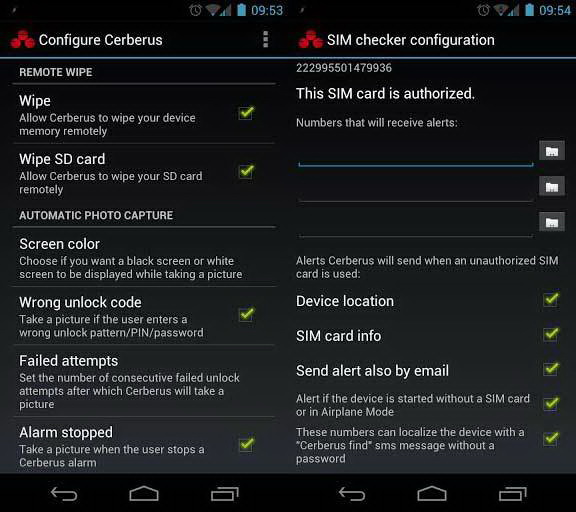
The app works even if the device does not have an internet connection thanks to remote control by sms messages. Also, the SIM Checker feature allows you to know the new number to send texts to, if the SIM card is changed. Texts received and sent for Cerberus remote control will not start any notification and will not appear in the Messages application.
Cerberus does not drain the battery because there is no background service running: it will activate only if there is a remote control request and will stop afterwards.
This app supports additional features for rooted android devices: complete uninstall protection (a thief will be able to delete Cerberus only by flashing another ROM), GPS auto-enabling even on Android > 2.3.3.
I know I have said it a lot of times but I will still say it again, safety comes first. It is always a good idea to have an anti-theft app installed in your phone, irrespective of rooting.
Cerberus automatically enables GPS if it is off when you try to localize your device (only on Android < 2.3.3) and you can protect it from unauthorized uninstalling - more info in the app configuration.
The app works even if the device does not have an internet connection thanks to remote control by sms messages. Also, the SIM Checker feature allows you to know the new number to send texts to, if the SIM card is changed. Texts received and sent for Cerberus remote control will not start any notification and will not appear in the Messages application.
Cerberus does not drain the battery because there is no background service running: it will activate only if there is a remote control request and will stop afterwards.
This app supports additional features for rooted android devices: complete uninstall protection (a thief will be able to delete Cerberus only by flashing another ROM), GPS auto-enabling even on Android > 2.3.3.
I know I have said it a lot of times but I will still say it again, safety comes first. It is always a good idea to have an anti-theft app installed in your phone, irrespective of rooting.
Cerberus Anti Theft - Because Safety Comes First
3 min read
I know I have covered an anti-theft app recently but I firmly believe that one can never be too careful and no matter how expensive or inexpensive something is, whether it holds great value to us or not, even if it means absolutely nothing to us, nothing should be stolen. However, our smart phones or should I say smart devices, are at the greatest risk of getting stolen not just because these devices are very costly but also because what these devices contain, our personal information, is priceless.
As much as I hate to think like this but there are all kinds of people on this earth and theft is not just about robbers gaining a nice hardware to sell off. They get more money out of misusing our personal information, our private pictures and a lot more. So, as I said earlier, since safety comes first, today I am going to cover another anti theft app so that you get a bit of a variety to choose from and see what suits you best.
Therefore, without further ado, lets put our hands together for Cerberus Anti Theft. Cerberus is a complete anti-theft application, the best protection you can get to recover your misplaced, lost or stolen Android device. This is a free trial for one week, then you can buy a lifetime license for a small price from within the application: no monthly or yearly fees, just a one-time payment. License is associated to your Cerberus account, if you have multiple devices you can use all of them (up to 3) with the same account.
It has three ways to protect your device:
- Remote control through the website www.cerberusapp.com
- Remote control via text messages
- SIM Checker (for devices that have a SIM card): you will automatically receive alerts if someone uses your phone with an unauthorized SIM card
Remote control allows you to perform many operations on your device, like:
- Locate and track it
- Start a loud alarm, even if the device is set to silent mode
- Wipe the internal memory and the SD card
- Hide Cerberus from the app drawer
- Lock the device with a code
- Record audio from the microphone
- Get a list of last calls sent and received
- Get information about network and operator the device is connected to
Cerberus automatically enables GPS if it is off when you try to localize your device (only on Android < 2.3.3) and you can protect it from unauthorized uninstalling - more info in the app configuration.
The app works even if the device does not have an internet connection thanks to remote control by sms messages. Also, the SIM Checker feature allows you to know the new number to send texts to, if the SIM card is changed. Texts received and sent for Cerberus remote control will not start any notification and will not appear in the Messages application.
Cerberus does not drain the battery because there is no background service running: it will activate only if there is a remote control request and will stop afterwards.
This app supports additional features for rooted android devices: complete uninstall protection (a thief will be able to delete Cerberus only by flashing another ROM), GPS auto-enabling even on Android > 2.3.3.
I know I have said it a lot of times but I will still say it again, safety comes first. It is always a good idea to have an anti-theft app installed in your phone, irrespective of rooting.
Cerberus automatically enables GPS if it is off when you try to localize your device (only on Android < 2.3.3) and you can protect it from unauthorized uninstalling - more info in the app configuration.
The app works even if the device does not have an internet connection thanks to remote control by sms messages. Also, the SIM Checker feature allows you to know the new number to send texts to, if the SIM card is changed. Texts received and sent for Cerberus remote control will not start any notification and will not appear in the Messages application.
Cerberus does not drain the battery because there is no background service running: it will activate only if there is a remote control request and will stop afterwards.
This app supports additional features for rooted android devices: complete uninstall protection (a thief will be able to delete Cerberus only by flashing another ROM), GPS auto-enabling even on Android > 2.3.3.
I know I have said it a lot of times but I will still say it again, safety comes first. It is always a good idea to have an anti-theft app installed in your phone, irrespective of rooting.
Newsletter
Get the latest tech news delivered to your inbox weekly.