

 While it helps our rooted android devices in a lot of ways, yet, it has a few limitations, including:
* Only 3 mount pairs allowed
* File Explorer does not list the sizes of the displayed folders
* Some restrictions apply on the on the type/path of source folder
There is, however, a solution to these limitations and that solution is called the PRO version of this app which can be purchased from within the app to unlock these limitations. This is how you can do it:
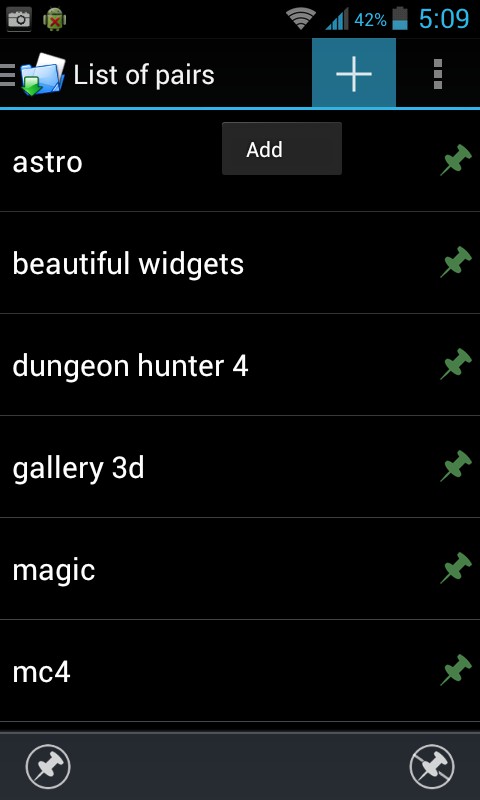
* Add a folder pair. Source is the internal SD card and destination is your extSdCard
* After adding, FM will offer to move the files for you. Click yes.
* Wait until the move operation is done then click on the PIN. If PIN turns green, you're all set.
* The files will exist in both the source and destination after mounting. This is expected and is normal. The files you see in your internal SD card actually reside in your external SD card now and if you "unpin" the pair, you'll see that your internal SD card is empty again.
Folder Mount is a great app that helps in utilising your device’s external storage which goes to waste a lot of times because of the automatic settings of most of the apps that we download.
While it helps our rooted android devices in a lot of ways, yet, it has a few limitations, including:
* Only 3 mount pairs allowed
* File Explorer does not list the sizes of the displayed folders
* Some restrictions apply on the on the type/path of source folder
There is, however, a solution to these limitations and that solution is called the PRO version of this app which can be purchased from within the app to unlock these limitations. This is how you can do it:
* Add a folder pair. Source is the internal SD card and destination is your extSdCard
* After adding, FM will offer to move the files for you. Click yes.
* Wait until the move operation is done then click on the PIN. If PIN turns green, you're all set.
* The files will exist in both the source and destination after mounting. This is expected and is normal. The files you see in your internal SD card actually reside in your external SD card now and if you "unpin" the pair, you'll see that your internal SD card is empty again.
Folder Mount is a great app that helps in utilising your device’s external storage which goes to waste a lot of times because of the automatic settings of most of the apps that we download.
Folder Mount - To Deal With Insufficient Storage Space
3 min read
No matter how much storage space our device has, it is never enough. We always reach that point when our phone camera refuses to click any more pictures making us realise that we have really taken to the selfie trend. But that puppy is so cute and we desperately need to click it so we start cursing our devices when they ask us to do something about our storage. And since that moment is not going to last forever and we really want to click that picture, with tears in our eyes we scroll through our photo album and delete those amazing (exactly same) selfies that we clicked this morning and last night and every hour before it to capture the puppy.
If only phones has 500 GB memory like some laptops, our lives would be sorted, at least till the time we fill the whole of it with more selfies.
Anyway, there is a way how you can save those already existing fabulous pictures and click many more new ones on your device and that way is an app called Folder Mount. This app works on rooted devices and deals with insufficient storage space. Since most users utilize Android devices with a lot of bloatware and apps that leave behind big files on the internal SD (even though the external SD is a lot bigger but because of the default option in most of these apps), the internal SD gets overloaded.
Thus, Folder Mount has the ability to link folders in your internal SD card to folders in your external SD card thereby populating the internal SD card folders with content that really exists in the external card. This helps us free space and have multiple games/apps with big data stored simultaneously without the need to uninstall. For Nexus devices with no external SD card, this application should help link folders to a usb flash drive for example.
Folder Mount’s features include:
* Mount internal SD card folders to external SD folders.
* Move content from internal to external when a pair is added.
* Support for Android 2.3 - 5.0.
* Holo themed throughout and an intuitive GUI design.
* It will check SDCARD mount status and remount if necessary.
While it helps our rooted android devices in a lot of ways, yet, it has a few limitations, including:
* Only 3 mount pairs allowed
* File Explorer does not list the sizes of the displayed folders
* Some restrictions apply on the on the type/path of source folder
There is, however, a solution to these limitations and that solution is called the PRO version of this app which can be purchased from within the app to unlock these limitations. This is how you can do it:
* Add a folder pair. Source is the internal SD card and destination is your extSdCard
* After adding, FM will offer to move the files for you. Click yes.
* Wait until the move operation is done then click on the PIN. If PIN turns green, you're all set.
* The files will exist in both the source and destination after mounting. This is expected and is normal. The files you see in your internal SD card actually reside in your external SD card now and if you "unpin" the pair, you'll see that your internal SD card is empty again.
Folder Mount is a great app that helps in utilising your device’s external storage which goes to waste a lot of times because of the automatic settings of most of the apps that we download.
While it helps our rooted android devices in a lot of ways, yet, it has a few limitations, including:
* Only 3 mount pairs allowed
* File Explorer does not list the sizes of the displayed folders
* Some restrictions apply on the on the type/path of source folder
There is, however, a solution to these limitations and that solution is called the PRO version of this app which can be purchased from within the app to unlock these limitations. This is how you can do it:
* Add a folder pair. Source is the internal SD card and destination is your extSdCard
* After adding, FM will offer to move the files for you. Click yes.
* Wait until the move operation is done then click on the PIN. If PIN turns green, you're all set.
* The files will exist in both the source and destination after mounting. This is expected and is normal. The files you see in your internal SD card actually reside in your external SD card now and if you "unpin" the pair, you'll see that your internal SD card is empty again.
Folder Mount is a great app that helps in utilising your device’s external storage which goes to waste a lot of times because of the automatic settings of most of the apps that we download.
Newsletter
Get the latest tech news delivered to your inbox weekly.