

 One if its more prominent features include application management on rooted android devices.
- Android 2.2+ Apps to SD
- Backup or restore any system or data app
- Remove any system or data app
- Batch removal/backup included
It also supports add-ons, including:
- Install a boot animation from a list of 30 animations
- Enable random boot animations on each boot-up (in settings)
- Install custom fonts (25+)
- Pull-down text editor
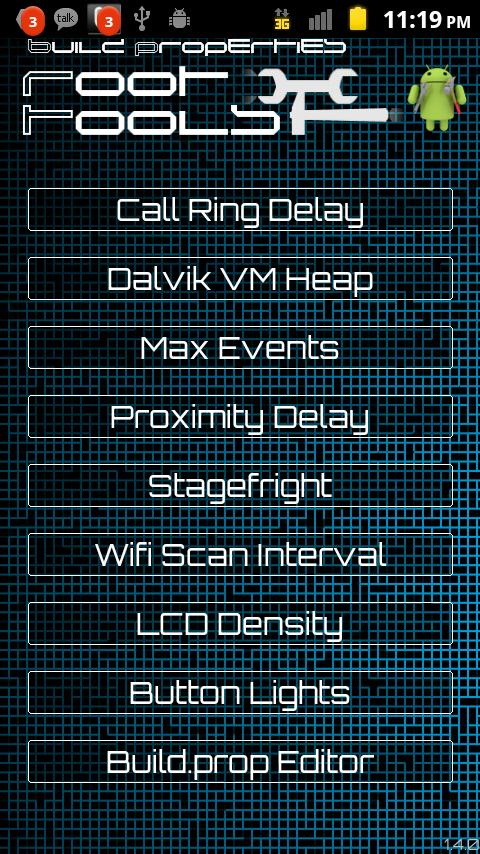
While Root Tools gives, it also takes but in a good way. It contains a lot of tweaks and hacks to block ads. On a different note, it builds property edits:
- Reduce call ring delay time to save battery
- Set the dalvik vm heap to increase performance
- Set max events manager and proximity delay
- Manage stagefright player
- Set the wi-fi scan interval to save battery life
- Choose your LCD density (like changing the resolution on your PC screen)
- Turn on or off hard key lights while the screen is on
Not just this, you can even edit the build.prop from within the app with your own custom edits.
Apart from the above mentioned features, it even manages caches by clearing all data or SD card caches or moving it to and fro form the phone. Root Tools allows you to customize the app and make it your own. You can change the entire look of it through theme settings in the main settings menu. Through settings you can also manage backups, access android hidden testing menu, enable or disable your boot animation, turn on/off camera shutter sounds and configure sysctl.conf to maximize performance for more advanced users.
Root Tools proves to be a good app to manage the huge responsibility that a rooted android device gives you in an easy way, without harming your device in the process!
One if its more prominent features include application management on rooted android devices.
- Android 2.2+ Apps to SD
- Backup or restore any system or data app
- Remove any system or data app
- Batch removal/backup included
It also supports add-ons, including:
- Install a boot animation from a list of 30 animations
- Enable random boot animations on each boot-up (in settings)
- Install custom fonts (25+)
- Pull-down text editor
While Root Tools gives, it also takes but in a good way. It contains a lot of tweaks and hacks to block ads. On a different note, it builds property edits:
- Reduce call ring delay time to save battery
- Set the dalvik vm heap to increase performance
- Set max events manager and proximity delay
- Manage stagefright player
- Set the wi-fi scan interval to save battery life
- Choose your LCD density (like changing the resolution on your PC screen)
- Turn on or off hard key lights while the screen is on
Not just this, you can even edit the build.prop from within the app with your own custom edits.
Apart from the above mentioned features, it even manages caches by clearing all data or SD card caches or moving it to and fro form the phone. Root Tools allows you to customize the app and make it your own. You can change the entire look of it through theme settings in the main settings menu. Through settings you can also manage backups, access android hidden testing menu, enable or disable your boot animation, turn on/off camera shutter sounds and configure sysctl.conf to maximize performance for more advanced users.
Root Tools proves to be a good app to manage the huge responsibility that a rooted android device gives you in an easy way, without harming your device in the process!

Root Tools - What Happens After Rooting
3 min read
While everyone is fearlessly opting to root their android devices because of the whole new world it opens up for our device, what exactly happens after we root the device? You must have read and heard a lot about the benefits of rooting - how it enhances the phone performance, how it allows you to super customize the phone, how it lets the pre-installed settings bow down at your feet, how it opens up a plethora of apps that can be used only on unlocked devices, basically, how it gives you more freedom to use your phone the way you want to, what exactly can we do after rooting our device and how can we do it?
While there are a number of ways and a number of apps that can help you with whatever you want to do to your phone (no pun intended) once you get complete control over it, the app that we will talk about is very simply called Root Tools. Root Tools is the ultimate tool for unlocked/rooted devices. Now that you are rooted you can customize your phone to the max simply with this app. Increase performance or change fonts and boot animations with a single click. Remove system or data apps easily and more.
One if its more prominent features include application management on rooted android devices.
- Android 2.2+ Apps to SD
- Backup or restore any system or data app
- Remove any system or data app
- Batch removal/backup included
It also supports add-ons, including:
- Install a boot animation from a list of 30 animations
- Enable random boot animations on each boot-up (in settings)
- Install custom fonts (25+)
- Pull-down text editor
While Root Tools gives, it also takes but in a good way. It contains a lot of tweaks and hacks to block ads. On a different note, it builds property edits:
- Reduce call ring delay time to save battery
- Set the dalvik vm heap to increase performance
- Set max events manager and proximity delay
- Manage stagefright player
- Set the wi-fi scan interval to save battery life
- Choose your LCD density (like changing the resolution on your PC screen)
- Turn on or off hard key lights while the screen is on
Not just this, you can even edit the build.prop from within the app with your own custom edits.
Apart from the above mentioned features, it even manages caches by clearing all data or SD card caches or moving it to and fro form the phone. Root Tools allows you to customize the app and make it your own. You can change the entire look of it through theme settings in the main settings menu. Through settings you can also manage backups, access android hidden testing menu, enable or disable your boot animation, turn on/off camera shutter sounds and configure sysctl.conf to maximize performance for more advanced users.
Root Tools proves to be a good app to manage the huge responsibility that a rooted android device gives you in an easy way, without harming your device in the process!
One if its more prominent features include application management on rooted android devices.
- Android 2.2+ Apps to SD
- Backup or restore any system or data app
- Remove any system or data app
- Batch removal/backup included
It also supports add-ons, including:
- Install a boot animation from a list of 30 animations
- Enable random boot animations on each boot-up (in settings)
- Install custom fonts (25+)
- Pull-down text editor
While Root Tools gives, it also takes but in a good way. It contains a lot of tweaks and hacks to block ads. On a different note, it builds property edits:
- Reduce call ring delay time to save battery
- Set the dalvik vm heap to increase performance
- Set max events manager and proximity delay
- Manage stagefright player
- Set the wi-fi scan interval to save battery life
- Choose your LCD density (like changing the resolution on your PC screen)
- Turn on or off hard key lights while the screen is on
Not just this, you can even edit the build.prop from within the app with your own custom edits.
Apart from the above mentioned features, it even manages caches by clearing all data or SD card caches or moving it to and fro form the phone. Root Tools allows you to customize the app and make it your own. You can change the entire look of it through theme settings in the main settings menu. Through settings you can also manage backups, access android hidden testing menu, enable or disable your boot animation, turn on/off camera shutter sounds and configure sysctl.conf to maximize performance for more advanced users.
Root Tools proves to be a good app to manage the huge responsibility that a rooted android device gives you in an easy way, without harming your device in the process!
Newsletter
Get the latest tech news delivered to your inbox weekly.