

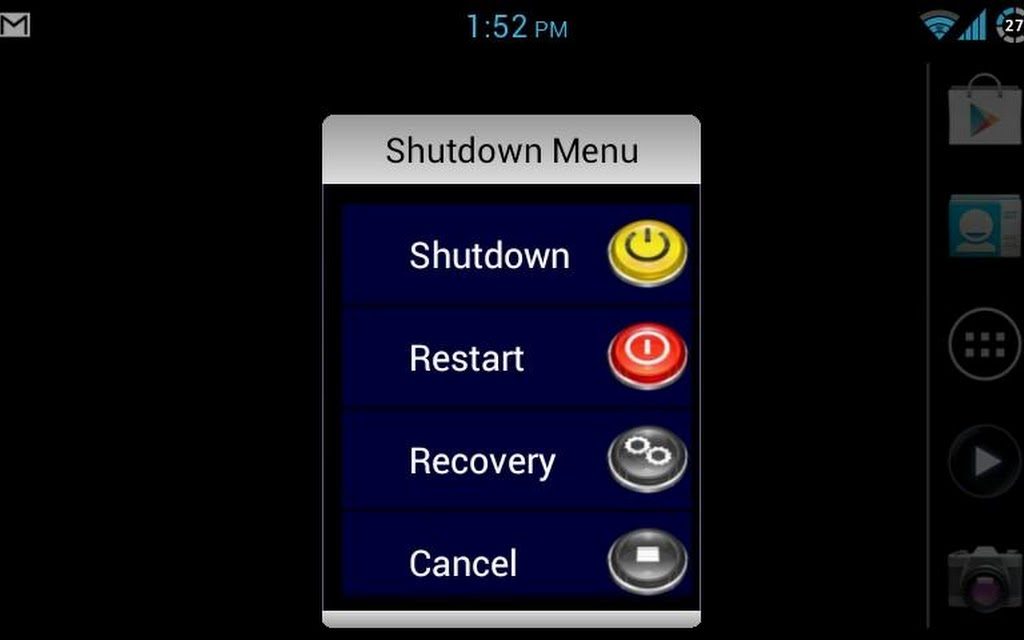
 Having to select “Power off" or "Shutdown", waiting for the device to shut down, and finally manually turning the device back on just to do a simple reboot can get very annoying. This simple app offers you a solution to restart (reboot), shutdown (power off), and restart into recovery mode if your device is rooted. As well for us ICS or Jellybean users, you no longer will receive the additional prompt verifying if you really want to shut down or restart your device. Keep in mind this does not replace your standard shutdown menu. Meaning the menu that displays when you press and hold your power button on your device. This will allow you to place a simple shortcut on your home screen to quickly restart (reboot), shutdown (power off), or restart into recovery mode.
This can be very useful if you have a sticky or problematic power button. This is an extremely low resource using app, so it should be compatible with nearly all android powered devices. Another good thing about Shutdown Menu is that is is ad-free, aka, a win-win app.
Therefore, whatever problem your phone is giving you, sometimes the best option is to shut it down and nothing makes this function easier than Shutdown Menu, making it a must to download!
Having to select “Power off" or "Shutdown", waiting for the device to shut down, and finally manually turning the device back on just to do a simple reboot can get very annoying. This simple app offers you a solution to restart (reboot), shutdown (power off), and restart into recovery mode if your device is rooted. As well for us ICS or Jellybean users, you no longer will receive the additional prompt verifying if you really want to shut down or restart your device. Keep in mind this does not replace your standard shutdown menu. Meaning the menu that displays when you press and hold your power button on your device. This will allow you to place a simple shortcut on your home screen to quickly restart (reboot), shutdown (power off), or restart into recovery mode.
This can be very useful if you have a sticky or problematic power button. This is an extremely low resource using app, so it should be compatible with nearly all android powered devices. Another good thing about Shutdown Menu is that is is ad-free, aka, a win-win app.
Therefore, whatever problem your phone is giving you, sometimes the best option is to shut it down and nothing makes this function easier than Shutdown Menu, making it a must to download!
Shutdown Menu - To Give You the Relaxation You Deserve
3 min read
While you might think that today’s app is going to be preachy and tell you how all of us must sit back and relax once in a while, maybe you think that this app is going to help you meditate because living in today’s world is getting more stressful with every passing minute. But none of this is true. the one thing that functions non stop in our lives, and dare I say, more that we do, is our smartphone.
It keeps working day and night, every hour. Yes, we keep feeding it with charge but still, it goes on and on. As soon as we wake up it switches to active mode. It is there working with us when we are at work when we are in meetings, when we have to spend long hours and boring events, when we are relaxing, or are on a holiday. It works during the weekends as well, without any complaint. It works when we are in the restroom as well as every other time. It even works when we are sleeping because there are only a few of us who switch it off at night.
So since our devices function constantly, them throwing a fit and hanging up on us is bound to happen. And they are allowed. It has a simple solution. All you need to do is give them a little breather. Shut them down for a few minutes and switch them on again. That is all that they asks for! Unfortunately, all devices don’t have a simple function of restart and to give you that option, provided you have rooted your android device, is an app called Shutdown Menu.
Having to select “Power off" or "Shutdown", waiting for the device to shut down, and finally manually turning the device back on just to do a simple reboot can get very annoying. This simple app offers you a solution to restart (reboot), shutdown (power off), and restart into recovery mode if your device is rooted. As well for us ICS or Jellybean users, you no longer will receive the additional prompt verifying if you really want to shut down or restart your device. Keep in mind this does not replace your standard shutdown menu. Meaning the menu that displays when you press and hold your power button on your device. This will allow you to place a simple shortcut on your home screen to quickly restart (reboot), shutdown (power off), or restart into recovery mode.
This can be very useful if you have a sticky or problematic power button. This is an extremely low resource using app, so it should be compatible with nearly all android powered devices. Another good thing about Shutdown Menu is that is is ad-free, aka, a win-win app.
Therefore, whatever problem your phone is giving you, sometimes the best option is to shut it down and nothing makes this function easier than Shutdown Menu, making it a must to download!
Having to select “Power off" or "Shutdown", waiting for the device to shut down, and finally manually turning the device back on just to do a simple reboot can get very annoying. This simple app offers you a solution to restart (reboot), shutdown (power off), and restart into recovery mode if your device is rooted. As well for us ICS or Jellybean users, you no longer will receive the additional prompt verifying if you really want to shut down or restart your device. Keep in mind this does not replace your standard shutdown menu. Meaning the menu that displays when you press and hold your power button on your device. This will allow you to place a simple shortcut on your home screen to quickly restart (reboot), shutdown (power off), or restart into recovery mode.
This can be very useful if you have a sticky or problematic power button. This is an extremely low resource using app, so it should be compatible with nearly all android powered devices. Another good thing about Shutdown Menu is that is is ad-free, aka, a win-win app.
Therefore, whatever problem your phone is giving you, sometimes the best option is to shut it down and nothing makes this function easier than Shutdown Menu, making it a must to download!
Newsletter
Get the latest tech news delivered to your inbox weekly.