

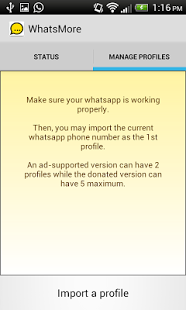
 It includes the following features:
- Allows Up to 2 phone numbers to be used with WhatsApp on the same device. (ad-supported version only)
- Allows Up to 5 phone numbers to be used with WhatsApp on the same device. (donate version only)
- Auto swapping WhatsApp accounts in a user preset interval.
- Shows notifications when swapping WhatsApp accounts.
- Shows notifications if there are unread messages of swapped out WhatsApp accounts.
- Launches an inactive WhatsApp account from the notification bar directly if it has unread messages. (donate version only)
- Launches any inactive WhatsApp account from within WhatsMore.
- Performs auto recovery upon the App starts (or the phone starts up) if the previous swapping process is interrupted. (ie. Power off, reboot of the mobile phone, upgrade from the play store)
So now you will not need to ditch a good dual-SIM phone just because you want another WhatsApp account. Just download WhatsMore and enjoy your dual-SIM phone to the fullest!
It includes the following features:
- Allows Up to 2 phone numbers to be used with WhatsApp on the same device. (ad-supported version only)
- Allows Up to 5 phone numbers to be used with WhatsApp on the same device. (donate version only)
- Auto swapping WhatsApp accounts in a user preset interval.
- Shows notifications when swapping WhatsApp accounts.
- Shows notifications if there are unread messages of swapped out WhatsApp accounts.
- Launches an inactive WhatsApp account from the notification bar directly if it has unread messages. (donate version only)
- Launches any inactive WhatsApp account from within WhatsMore.
- Performs auto recovery upon the App starts (or the phone starts up) if the previous swapping process is interrupted. (ie. Power off, reboot of the mobile phone, upgrade from the play store)
So now you will not need to ditch a good dual-SIM phone just because you want another WhatsApp account. Just download WhatsMore and enjoy your dual-SIM phone to the fullest!

WhatsMore - WhatsApp’s Charming New Duet Partner
3 min read
Since phones supporting just one SIM card were not good enough anymore, how many phones can one carry after all, there was the introduction of the dual SIM phones, but, little did those phone makers know that life is not just about having two numbers, it is more about having two WhatsApp accounts liked to those two numbers. However, since the device is one and the user interface is one, it is technically not possible to have two WhatsApp accounts because, as everyone knows, you can download one app just once on one device. So why should we let go of a WhatsApp account?
We might as well buy two phones. Right? Absolutely wrong because here is presenting an app that will let you make the most out of your rooted, dual-SIM android device and that app is called WhatsMore.
WhatsMore is an account management add-on for WhatsApp. It provides an easy way of swapping WhatsApp accounts. Dual-SIM mobile phones or Dual number phones are not uncommon in many countries. That is a good idea for segregation of contacts. However, dual-SIM phones usually do not support two WhatsApp accounts. That is the infrastructure of WhatsApp and we cannot change it. However, this situation is going to change.
This app – WhatsMore is an add-on account management to make WhatsApp holding more than 1 phone number even on a single-SIM mobile phone. Now, we can give different phone numbers to the family, co-workers, customers, net-friends, and etc… WhatsMore provides support up to 5 phone numbers to be linked to WhatsApp. It works in the way of time sharing. We can preset a swapping duration in the app. When the auto swapping switch is turned on, the phone numbers are brought to be active in turn, to receive messages. We can tell from the notification bar or the in-app status screen, if there are unread messages on each phone number.
With this app - WhatsMore, everyone can benefit from the advantage of having multiple phone numbers, much better than buying traditional dual-SIM phones.
It includes the following features:
- Allows Up to 2 phone numbers to be used with WhatsApp on the same device. (ad-supported version only)
- Allows Up to 5 phone numbers to be used with WhatsApp on the same device. (donate version only)
- Auto swapping WhatsApp accounts in a user preset interval.
- Shows notifications when swapping WhatsApp accounts.
- Shows notifications if there are unread messages of swapped out WhatsApp accounts.
- Launches an inactive WhatsApp account from the notification bar directly if it has unread messages. (donate version only)
- Launches any inactive WhatsApp account from within WhatsMore.
- Performs auto recovery upon the App starts (or the phone starts up) if the previous swapping process is interrupted. (ie. Power off, reboot of the mobile phone, upgrade from the play store)
So now you will not need to ditch a good dual-SIM phone just because you want another WhatsApp account. Just download WhatsMore and enjoy your dual-SIM phone to the fullest!
It includes the following features:
- Allows Up to 2 phone numbers to be used with WhatsApp on the same device. (ad-supported version only)
- Allows Up to 5 phone numbers to be used with WhatsApp on the same device. (donate version only)
- Auto swapping WhatsApp accounts in a user preset interval.
- Shows notifications when swapping WhatsApp accounts.
- Shows notifications if there are unread messages of swapped out WhatsApp accounts.
- Launches an inactive WhatsApp account from the notification bar directly if it has unread messages. (donate version only)
- Launches any inactive WhatsApp account from within WhatsMore.
- Performs auto recovery upon the App starts (or the phone starts up) if the previous swapping process is interrupted. (ie. Power off, reboot of the mobile phone, upgrade from the play store)
So now you will not need to ditch a good dual-SIM phone just because you want another WhatsApp account. Just download WhatsMore and enjoy your dual-SIM phone to the fullest!
Newsletter
Get the latest tech news delivered to your inbox weekly.