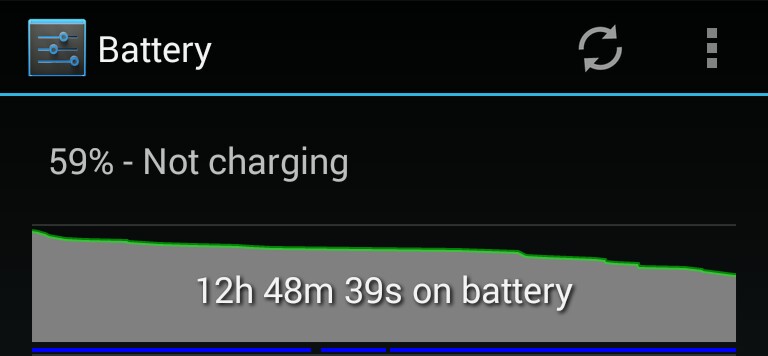
Use This One Simple Trick to Noticeably Increase Android Battery Life
2 min read
Sorry to lure you in with a clickbait-y headline like that, but I have to tell you about this one cool trick.
I used this trick to save a surprising amount of battery life. And it’s stupidly easy for anyone to do.
Follow the steps below to find out how you can save an hour or more of battery life every day:
Step 1) Go to Settings > Location
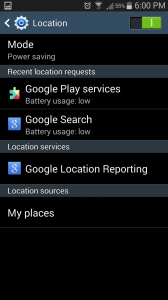
Step 2) Tap Mode
Step 3) Check the radial button beside Power saving
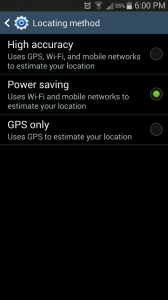
You’re done!
Basically, Google always wants to give you the best location data, so they make sure your phone can access all the data it needs to pinpoint your location.
Most people, however, don’t need to know their location down to the nearest 3 meters. Most people are satisfied with location information that’s accurate to the nearest 5 meters – which is approximately what you get with Power saving mode.
Anyways, after activating power saving mode, you should notice a substantial improvement in battery life.
I can’t believe I’ve never done this trick before. It’s so stupidly simple, but also surprisingly effective.
The only way this tip wouldn’t save significant amounts of battery life is if you never left the house or never let apps access your location (something that most apps do on a constant basis anyway).
Did this tip work for you? How much battery life did you save? I noticed my battery life go way up after implementing this trick – especially if I was spending a lot of time outside the house.

Step 2) Tap Mode
Step 3) Check the radial button beside Power saving
You’re done!
Basically, Google always wants to give you the best location data, so they make sure your phone can access all the data it needs to pinpoint your location.
Most people, however, don’t need to know their location down to the nearest 3 meters. Most people are satisfied with location information that’s accurate to the nearest 5 meters – which is approximately what you get with Power saving mode.
Anyways, after activating power saving mode, you should notice a substantial improvement in battery life.
I can’t believe I’ve never done this trick before. It’s so stupidly simple, but also surprisingly effective.
The only way this tip wouldn’t save significant amounts of battery life is if you never left the house or never let apps access your location (something that most apps do on a constant basis anyway).
Did this tip work for you? How much battery life did you save? I noticed my battery life go way up after implementing this trick – especially if I was spending a lot of time outside the house.

One Click Root Author
Content Writer
Experienced writer covering technology and mobile development.
You Might Also Like
How-To
Android 14 Root Methods: What Changed?
Explore the new root methods and security changes in Android 14.
How-To
Latest Android Security Updates Impact Root Access
Understanding how the latest security patches affect root methods.
How-To
Google Pixel 8 Pro Root Guide Released
Complete step-by-step guide to rooting the Google Pixel 8 Pro.
Comments
JD
John Doe
2 days ago
Great article! Very informative and well-written. Thanks for sharing.
JS
Jane Smith
5 days ago
I found the security section particularly helpful. Looking forward to more content like this!
Leave a Comment
Newsletter
Get the latest tech news delivered to your inbox weekly.
Popular Posts
-
1
Getting Started with Android Development
12.5K views
-
2
Best Practices for Mobile Security
8.2K views
-
3
Understanding Smartphone Hardware
6.8K views