

 It also supports protocols, including:
RFC-3920: Core
RFC-3921: Instant Messaging and Presence
XEP-0030: Service Discovery
XEP-0128: Service Discovery Extensions
XEP-0115: Entity Capabilities
XEP-0054: vcard-temp
XEP-0153: vCard-Based Avatars
This is not all, it supports many other protocols as well.
Basically, whatever mess you throw at Xabber, no matter how big it is and no matter what device you use, Xabber is going to happily clean everything up for you to make your phone system faster and work better.
Not only that, it will also make your apps work better, in a clean environment. So don’t wait for the day your phone hangs up due to overload of unnecessary stuff, download it now and start the spring cleaning of your phone!
It also supports protocols, including:
RFC-3920: Core
RFC-3921: Instant Messaging and Presence
XEP-0030: Service Discovery
XEP-0128: Service Discovery Extensions
XEP-0115: Entity Capabilities
XEP-0054: vcard-temp
XEP-0153: vCard-Based Avatars
This is not all, it supports many other protocols as well.
Basically, whatever mess you throw at Xabber, no matter how big it is and no matter what device you use, Xabber is going to happily clean everything up for you to make your phone system faster and work better.
Not only that, it will also make your apps work better, in a clean environment. So don’t wait for the day your phone hangs up due to overload of unnecessary stuff, download it now and start the spring cleaning of your phone!
Xabber - Because Even Chats Require Spring Cleaning
3 min read
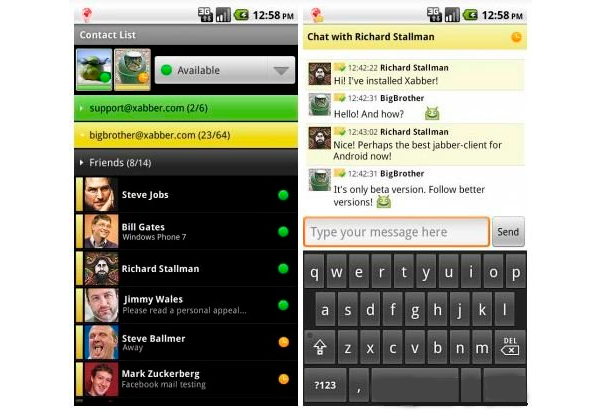
While we have many apps that clean up our smart phones and assist us with various phone related things, like assisting us with our calls, blocking unnecessary marketing calls, integrating various social media platforms, managing our batteries, giving us directions and much more. We take care of almost everything on our phones but sometimes forget that a clutter forms with so much of texting, and cleaning is required.
Unfortunately, we have become too busy to clean our own phone mess. Fortunately, there is an app that can do that for you.That app is Xabber. It is a multi - account support and clean system with a simple interface.
It has a lot, and I mean A LOT of features including multiple accounts, quick switch between simultaneous chats, rich visibility settings for contacts and groups, compatible with all standard XMPP servers, pre-configured support of GTalk, Facebook chat, Livejournal chat, Vkontakte, Ya.Online, Google Apps Gtalk accounts and a whole world of insanely good features.
The best thing about this app is that even though it is free (and yet so amazing, some good things do come for free!), it does not support any add-ons on its interface while allowing you to visually customize your multiple accounts for easy sorting. One of the really helpful, potentially life saving, features of this app is that you can choose for it to run in the background, thus, saving a lot of battery.
Since Xabber has launched, there have been some new features added to the app, based on user review and requirements, including TOR support using ORBOT, proxy support, support of new languages like Italian, Persian, Portuguese and more. Not only has this app added new features, it has even fixed some glitches it had at the time of its launch. A few of these glitches are notifications in Android 4+, server side history, exit from the app as well as translations.
Even though Xabber was already an amazing app not just because it has innumerable features but mainly because its unique selling point lies in its simple and user friendly interface, it managed to become even better by fixing its glitches.
Amazed? So was I. The app supports a lot of pre-configured services including GTalk, Windows Live Messenger, Facebook Chat, QIP and much more!
It also supports protocols, including:
RFC-3920: Core
RFC-3921: Instant Messaging and Presence
XEP-0030: Service Discovery
XEP-0128: Service Discovery Extensions
XEP-0115: Entity Capabilities
XEP-0054: vcard-temp
XEP-0153: vCard-Based Avatars
This is not all, it supports many other protocols as well.
Basically, whatever mess you throw at Xabber, no matter how big it is and no matter what device you use, Xabber is going to happily clean everything up for you to make your phone system faster and work better.
Not only that, it will also make your apps work better, in a clean environment. So don’t wait for the day your phone hangs up due to overload of unnecessary stuff, download it now and start the spring cleaning of your phone!
It also supports protocols, including:
RFC-3920: Core
RFC-3921: Instant Messaging and Presence
XEP-0030: Service Discovery
XEP-0128: Service Discovery Extensions
XEP-0115: Entity Capabilities
XEP-0054: vcard-temp
XEP-0153: vCard-Based Avatars
This is not all, it supports many other protocols as well.
Basically, whatever mess you throw at Xabber, no matter how big it is and no matter what device you use, Xabber is going to happily clean everything up for you to make your phone system faster and work better.
Not only that, it will also make your apps work better, in a clean environment. So don’t wait for the day your phone hangs up due to overload of unnecessary stuff, download it now and start the spring cleaning of your phone!
Newsletter
Get the latest tech news delivered to your inbox weekly.